
Company Status Checker
Look up what a CIPC company status means and what to do next.
Status meanings are from the CIPC Company Status Check guide, drawn from CIPC's own documents. Where CIPC's guidelines do not explain a status, the guide says so instead of guessing. Verify on the official CIPC website.
CIPC has more than one online portal, which is why many people struggle to log in. This guide shows which portal to use, how to sign in with your ID number or customer code, and how to create a profile if you are new.
Quick answer: For most company services, log in at bizportal.gov.za with your 13-digit South African ID number and your CIPC password. You can also log in to CIPC e-Services at eservices.cipc.co.za with your customer code and password. Foreign nationals without a South African ID use their customer code. New users must first register as a CIPC customer.
Which CIPC Login Page Should You Use?
CIPC lists its portals on its portal logins page. Each one serves a different purpose.
| Portal | Web address | Use it for | Signs in with |
|---|---|---|---|
| BizPortal | bizportal.gov.za | Company registration, annual returns, director changes, name reservations | SA ID number and CIPC password, or customer code |
| CIPC e-Services | eservices.cipc.co.za | Customer registration, beneficial ownership, account statements, most filings | Customer code and password |
| New e-Services | k2.cipc.co.za | Newer CIPC online services | Customer details as prompted |
| IP e-Services | iponline.cipc.co.za | Trade marks, patents and designs | IP online account |
| Enquiries (CEMS) | enquiries.cipc.co.za | Logging and tracking queries | Separate enquiry login |
If you are unsure, start with BizPortal. It handles the services most small business owners need.
How to Log In to BizPortal With Your ID Number
- Go to bizportal.gov.za and click Login.
- Enter your 13-digit South African ID number.
- Enter your CIPC password.
- Answer any verification questions. BizPortal may ask questions linked to your ID record or your spouse's, such as your ID issue date.
- Once signed in, choose the service you need from the menu.
If you do not have a South African ID, select the option that says you do not have one and sign in with your CIPC customer code instead.
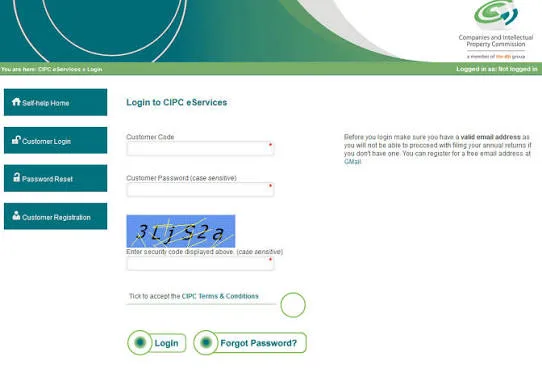
How to Log In to CIPC e-Services With a Customer Code
- Go to eservices.cipc.co.za.
- Enter your customer code.
- Enter your password and sign in.
- Use the menu to file, transact or view your account. Your account statement is under Transact, then Customers Transactions.
What Is a CIPC Customer Code?
A customer code is the unique code CIPC gives you when you register as a customer. It identifies your profile and also acts as your prepaid CIPC account. That is why CIPC asks you to use your six-character customer code as the reference when you deposit money (see CIPC banking details).
Keep your customer code with your other business records. You need it to log in to e-Services, to pay CIPC and to log many enquiries. If you have lost it, see CIPC password reset.
How to Register as a New CIPC Customer
You cannot log in until you have a customer profile. CIPC's terms say anyone who wants to use its services must register through the customer registration facility.
- Go to eservices.cipc.co.za and choose the option to register as a customer.
- Enter your ID number (or passport details if you are a foreign national) and your personal details.
- Enter a cellphone number and email address that you control. CIPC uses these to send one-time PINs and password resets, so do not use someone else's details.
- Create a password that meets CIPC's password rules.
- Complete the verification steps and note the customer code you receive.
CIPC publishes a customer registration step-by-step guide if you want screenshots of each step.
Foreign nationals
If you do not have a South African ID, CIPC needs to verify your passport through its Foreigner Assurance service before some services become available. See CIPC Foreign Assurance.
How to Keep Your CIPC Account Safe
CIPC's terms make you responsible for every transaction done with your login, so protect it.
- Only sign in on bizportal.gov.za or cipc.co.za addresses. Check the address bar before you type anything.
- Never share your password or OTP with anyone, including people who say they work for CIPC.
- If you think someone else used your login, tell CIPC in writing straight away, as its terms require.
- Keep your cellphone number and email up to date, so reset codes reach you.
After CIPC reported a security breach in March 2024, it asked existing users to re-verify their profiles and set new passwords. If you have not logged in for a long time, you may be asked to do this.
CIPC Login Problems and Fixes
| Problem | What to do |
|---|---|
| Wrong password or locked out | Use Reset password on BizPortal. See CIPC password reset. |
| Reset code goes to an old number or email | Update your contact details through CIPC's reset process (see the password reset guide) |
| Forgot customer code | See CIPC password reset |
| Verification questions keep failing | Check your ID details are current with Home Affairs, then log a query at enquiries.cipc.co.za |
| Site will not load | Check the notices on cipc.co.za for downtime, then try again later |
| Foreign national cannot complete login | Complete Foreigner Assurance first (see the Foreigner Assurance guide) |
Frequently Asked Questions
Can I log in to CIPC with my ID number?
Yes. South African citizens can log in to BizPortal with their 13-digit ID number and CIPC password.
What is the difference between BizPortal and CIPC e-Services?
BizPortal is the government's business registration portal and handles common company services. CIPC e-Services is CIPC's own portal and is used with a customer code for a wider range of filings and account functions.
Is there a CIPC app?
CIPC refers to a mobile app as one of its channels for name reservations and registrations. Download it only from an official app store listing published by CIPC.
Can my accountant log in for me?
An accountant or agent should use their own customer profile, with your written mandate where a filing requires one. Do not hand over your own password.
Does CIPC charge for creating a login?
CIPC's fee table does not list a charge for customer registration. Fees apply to the services you use after you log in.